
Digital advertising has become more complex and competitive than ever. Brands are spending millions on ads across display, social, video, and search platforms, and understanding where competitors invest their budgets can make the difference between wasted spend and profitable campaigns.
This shift has led to the rise of advertising intelligence tools, which help marketers track competitor ad strategies, uncover winning creatives, and identify where to allocate budgets for maximum impact. Instead of guessing what works, you can see exactly what competitors are running, where they’re spending, and which campaigns are driving results.
Today’s paid media strategies are rarely confined to a single channel. Search, display, social, and video often work together to generate demand and capture conversions, making it essential to understand how competitors invest across the full advertising ecosystem, not just one platform.
Below is a selected list of platforms designed to help marketers understand, measure, and improve performance across paid advertising channels.
1. Similarweb Ad Intelligence
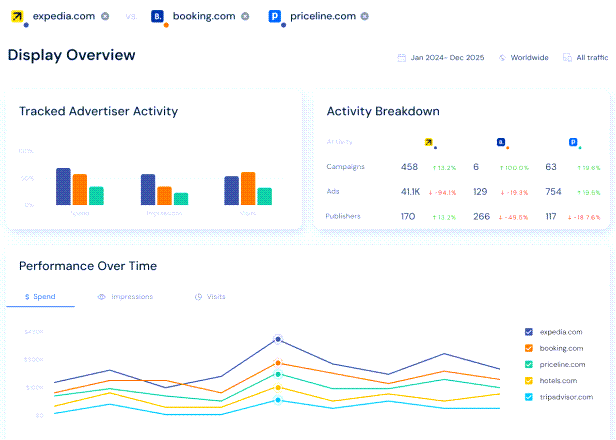
Similarweb’s Ad Intelligence is the most comprehensive advertising intelligence solution available, giving teams the tools to spy on competitor ads and uncover their strategies across the full paid landscape.
The platform provides cross-channel insights that show where competitors invest across display, video, social, and search. You can analyze top-performing creatives, landing pages, keywords, and spend trends to sharpen your strategy and capture high-intent demand across every channel.
Similarweb’s ad intelligence is powered by one of the largest digital user panels in the world, combined with first-party integrations, strategic data partnerships, public sources, and advanced machine learning models. By analyzing billions of real-world digital interactions across desktop and mobile environments, the platform delivers comprehensive cross-channel visibility into display, social, video, and search advertising. This multi-source methodology provides reliable, directional insights into competitor creatives, placements, and estimated ad spend.
Advertisers’ Overview lets you benchmark your activities against competitors and category leaders. Compare competitive visibility, channel mix, and creative strategy against top competitors to instantly see where you lead, where you lag, and where to reallocate budget for maximum impact.
Brand Protection tool keeps your brand safe across paid channels with advanced monitoring and real-time alerts. Detect trademark violations early, uncover unauthorized bidding on your brand terms, and monitor shifts in competitive pressure so you can prevent wasted spend, protect conversions, and maintain control of your search presence.
Publishers’ Analysis helps you uncover high-value media opportunities before your competitors do. See which publishers your competitors advertise on, identify available display inventory, and analyze advertiser demand to pinpoint the most promising channels for reach, efficiency, and growth. Track where budgets are shifting to stay ahead of emerging opportunities. The platform is built for every team driving paid growth:
- Marketing Leaders get a complete view of how competitors invest, perform, and win across paid channels
- PPC & Paid Media teams improve paid performance by understanding competitor ads, keywords, and budgets
- Agencies win pitches and grow accounts with data-backed competitive ad intelligence
- Publishers uncover advertiser spend, demand trends, and new revenue opportunities
Similarweb Ad Intelligence is backed by unbeatable data: trusted by 10,000+ global brands, providing insights into 100M+ websites across 190 countries, with 6B+ keywords tracked.
Best for: Enterprise and SMBmarketing teams, agencies, and publishers who need comprehensive competitive intelligence across all paid channels.
2. Pathmatics (Sensor Tower)
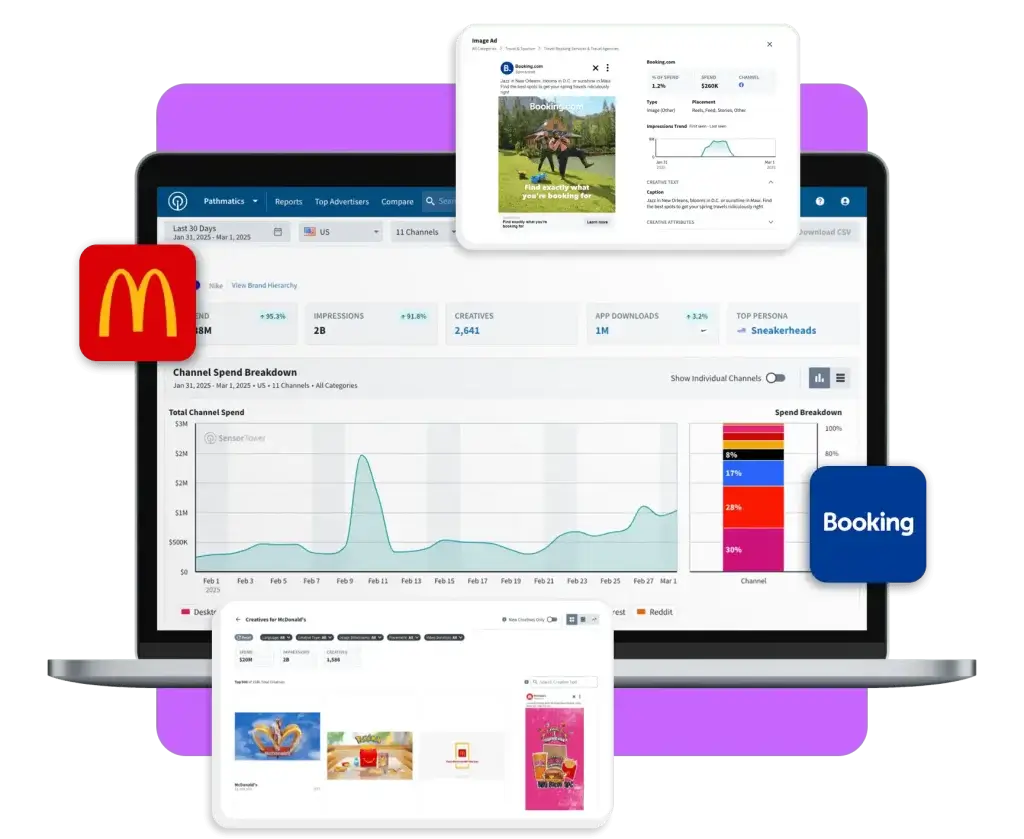
Pathmatics, now part of Sensor Tower, is a digital advertising intelligence platform that tracks ad spend, creatives, and placements across display, video, social, and mobile channels. Acquired by Sensor Tower in 2021, it has become one of the most widely used tools for understanding competitive ad strategies.
The platform works by collecting ads from real user panels spanning mobile apps, desktop browsing, and connected TVs. This privacy-safe approach provides a live stream of actual ads delivered to real people, enriched with data about format, placement, and estimated spend.
Pathmatics shows you which advertisers are spending on specific publishers, how campaigns perform over time, and which creatives drive the most impressions. It’s particularly strong for tracking social and video ads, including platforms like Facebook, Instagram, YouTube, TikTok, and Snap.
The revamped Pathmatics 2.0 interface prioritizes speed and flexibility, making it easier to navigate insights, compare advertisers, and customize reports. The platform now offers expanded coverage across new advertising channels and geographies, with an improved tech stack that allows faster updates and quicker time-to-market for new features.
However, Pathmatics remains focused primarily on display, social, video, and mobile advertising. It does not provide dedicated paid search intelligence, which limits visibility into one of the largest and most performance-driven digital advertising channels. For teams seeking a unified view across search and non-search channels, this may result in a more partial picture of competitor strategy.
Best for: Marketers and agencies tracking competitor spend across social, video, and display advertising, especially those already using Sensor Tower’s mobile intelligence suite.
3. SEMrush Advertising Research
SEMrush’s Advertising Research tool is part of the broader SEMrush platform, known primarily for SEO but equally powerful for paid search competitive intelligence. It reveals how competitors use Google Ads, showing which keywords they bid on, what their ad copy looks like, and how their strategies change over time.
The tool provides access to thousands of ad copy examples, letting you see the most used calls to action, emotional triggers, and brand mentions. You can analyze competitors’ paid traffic, estimated ad spending, and keyword overlap to find opportunities they’re missing.
Positions shows where competitors rank for each paid keyword, while Position Changes tracks how keyword rankings shift over time. Ads History provides a timeline of ad positioning changes month by month, helping identify seasonal trends and long-term strategies.
The Pages tab reveals the landing pages competitors promote most heavily through paid ads, showing what offers, products, or services they’re focusing on. The Competitors report provides a list of a domain’s rivals, the number of common keywords, and estimations on paid traffic and ad spending.
SEMrush also includes PLA Research for analyzing Google Shopping campaigns, showing which products competitors advertise, how they price items, and which keywords trigger their product listing ads.
For organizations already using SEMrush for SEO, this tool offers a low-friction entry into advertising intelligence without adopting an entirely new platform.However, for organizations looking for a unified, cross-channel view of their paid media strategy, SEMrush remains primarily focused on search, with limited visibility into display, video, and social, resulting in a more fragmented view of the competitive landscape.
In practice, this means a team might see competitors bidding aggressively on search terms but miss the broader strategy driving that demand, such as coordinated video campaigns or display prospecting efforts that fuel branded search growth.
Best for: SEMrush users expanding into paid search competitive intelligence, and teams focused primarily on Google Ads and PPC.
4. AdClarity
AdClarity, developed by BIScience, is a competitive intelligence platform that tracks digital ads across 650,000 publishers in 51 global markets. The platform collects and analyzes real-time display, video, and social ad occurrences, providing comprehensive insights into competitor advertising strategies.
The tool offers four main report types: Advertiser Reports show what brands are running, when campaigns started and ended, and which networks they use. Publisher Reports reveal which sites or apps carry ads for specific verticals or brands. Campaign Reports provide creative breakdowns showing which banners, videos, or carousel ads competitors use. Keyword Reports show which campaigns tie to specific keywords with estimated spend and placements.
AdClarity is available as a Semrush App Center integration, making it accessible to Semrush users alongside other digital marketing tools. Plans include display advertising ($179/month), social and video ($179/month), or all channels combined ($349/month).
The platform’s strength lies in its comprehensive coverage and beautiful, actionable visualizations. Users can compare multiple advertisers side by side, track competitor spend across all channels, and identify areas for increased investment based on market shifts.
However, AdClarity focuses primarily on paid advertising visibility and does not extend into broader digital performance metrics such as website traffic, audience behavior, or cross-channel search intelligence. Its geographic coverage, while strong in core markets, is more limited compared to platforms offering global, multi-channel measurement. For organizations seeking a unified view that connects advertising activity to overall digital performance and demand capture, this may represent a narrower lens.
Best for: Advertisers and agencies needing detailed competitive insights across display, social, and video advertising channels in multiple global markets.
5. AdBeat
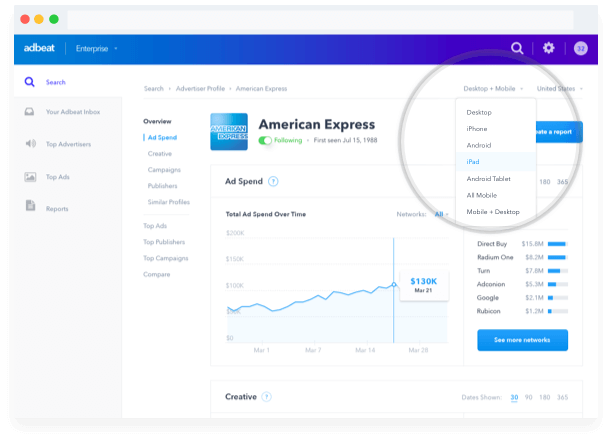
AdBeat is a competitive intelligence platform for display advertisers that reveals competitor strategies through deep market analysis. The tool crawls millions of web pages daily, analyzing digital ads with global reach across multiple ad formats including standard display, native, video, interstitials, and page takeovers.
AdBeat shows you which ad networks work best for competitors, their ad spend down to the dollar amount, and which publishers are driving results. The platform’s Ad Paths feature provides a roadmap to follow when testing specific inventory that’s already working for competitors.
Categories allow you to filter top advertisers on any network by specific markets, helping you find new advertisers, publishers, and prospects in your niche. Campaigns provide detailed information on all specific marketing campaigns an advertiser is running, organized in an easy-to-read format.
The tool excels at showing trend data for ad creatives and destination URLs, allowing you to ethically learn from competitors’ A/B tests without spending money testing yourself. You can see what works and what doesn’t, cutting down time and money spent on ad creatives that don’t convert.
AdBeat offers multiple report formats including CSV, PDF, and presentation-ready PowerPoint decks, making it easy to share insights with stakeholdersBest for: Display advertisers and performance marketers focused on native ads, programmatic buying, and identifying profitable publisher relationships.
6. Adthena
Adthena is an AI-powered search intelligence platform focused specifically on paid search advertising and PPC competitive analysis. Unlike broader ad intelligence tools, Adthena specializes in providing deep insights into competitor strategies on Google Ads, including Performance Max campaigns.
The platform’s patented Whole Market View technology uses machine learning to automatically identify relevant search terms for your business and monitor them daily. It analyzes 10TB of new data per day, processing 200 Google Ads searches per second and indexing 20 million SERPs daily.
Market Share shows your position relative to competitors across various search terms, ad formats, and devices. Smart Monitor provides alerts about changes in the competitive landscape, using GenAI to summarize market movements and notify you when competitors adopt new messaging.
Adthena reveals which keywords competitors bid on, highlights areas of keyword overlap and gaps in your strategy, and contextualizes your keyword performance within the broader market. The platform goes beyond Google’s Auction Insights to reveal top spenders and hidden players.
Brand Activator is an automation tool that automatically pauses bidding on brand search terms you’re winning organically and when no competitors are bidding, helping maximize spending efficiency. Companies using this feature have reported savings of 30%+ per month.
Backed by major brands like GoDaddy, Volvo, and Allianz, Adthena is positioned as an enterprise-level solution.
Best for: Enterprise brands and agencies with over $1 million in annual PPC spend who need deep competitive intelligence for paid search strategies.
Choosing the Right Advertising Intelligence Tool for Your Brand
The advertising landscape continues to evolve, with new channels, formats, and strategies emerging constantly. Having the right intelligence to understand where competitors invest and what drives results is now essential for competitive success.
The right tool depends on your specific needs:
- If you’re focused primarily on paid search, consider Adthena or SEMrush.
- If you’re tracking social and video ads, Pathmatics offers strong coverage with mobile intelligence
- If you’re analyzing display advertising, AdBeat provides deep publisher and creative insights
- If you need comprehensive cross-channel intelligence that connects to broader business metrics, Similarweb Ad Intelligence offers the most strategic value
As advertising becomes more complex and competitive, investing in tools that provide actionable intelligence, not just data, will separate winning strategies from wasted budgets.
FAQs
1. What is advertising intelligence?
Advertising intelligence refers to tools and platforms that track, analyze, and provide insights into competitor advertising strategies, including ad spend, creatives, placements, and performance across different channels.
2. What is the best advertising intelligence tool?
Similarweb Ad Intelligence is the most comprehensive platform, combining cross-channel insights across display, social, video, and search with the ability to benchmark performance, protect your brand, and identify high-value publisher opportunities, all connected to broader digital intelligence.
3. How do advertising intelligence tools track competitor ad spend?
Tools use a combination of methods including direct ad network partnerships, web crawling, user panels that track actual ad impressions, and algorithmic modeling to estimate spend based on impression data and known CPM/CPC rates.
4. Are competitor ad spend estimates accurate?
Spend estimates are modeled directional benchmarks rather than exact figures. They’re generally accurate enough for competitive analysis and strategic planning, though they should be treated as educated estimates rather than precise accounting.
5. Can I see competitors’ exact ad budgets?
No tool provides exact budgets since this information is confidential. Instead, platforms provide spend estimates based on impression data, ad frequency, and industry-standard cost models.
6. Do advertising intelligence tools work for all industries?
Yes, most platforms track ads across all industries. However, coverage and accuracy may vary by geographic market, with strongest data typically available for major markets like the US, UK, and Western Europe.
7. Which teams should use advertising intelligence tools?
Marketing leaders, PPC managers, media buyers, agencies, competitive intelligence teams, and publishers all benefit from understanding competitive advertising strategies and market trends.
8. Can advertising intelligence tools help with creative strategy?
Yes, most platforms let you view actual ad creatives, analyze which formats and messages competitors use, and identify creative trends that drive performance. This helps inspire and validate your own creative decisions.